
TIDRADIO H8 Gen 3 — Programming a Repeater from the Front Panel
Every menu number checked against the 3rd-generation TD-H8 manual and photographed on the radio.
~12 min · 0/10 required steps
This is the 3rd-generation H8 — and it is not the H9
Two things to check before you follow this page. Generation. These steps were verified against the TIDRADIO TD-H8 Ham manual, 3rd edition, July 2025, and photographed on that radio. TIDRADIO has since shipped a 4th-generation H8. Menu numbers can move between generations, so if a step does not match, trust the label on screen — Bandwidth, Tx CTCSS, Direction, Offset, Memory — over the number. Model. The H8 and H9 look similar and program completely differently. The H8 uses one flat list of numbered menu items, 0 to 25: press MENU, type the number, you are there. The H9 splits everything into two separate menus that both start at 1. If you have an H9, use the H9 guide instead.
Watch it first
Programming the Stone Mountain repeater into the H8, start to finish.
What you are setting
Six values, and you need all of them before you start. Look your repeater up on RepeaterBook.com or on your local club's site. The example below is the Stone Mountain machine in Georgia — substitute your own.
Settings and their menu numbers
| Setting | Menu | Example |
|---|---|---|
| Receive frequency | — | 146.760 MHz, typed in VFO mode |
| Bandwidth | 0 | Wide (25 kHz) |
| TX power | 2 | High |
| Transmit tone (Tx CTCSS) | 13 | 107.2 Hz |
| Offset direction | 23 | Minus |
| Offset amount | 24 | 00.600 MHz |
| Channel store | 25 | CH-001, named W4BOC-E |
Set everything BEFORE you store the channel
The steps
The menu numbers run in order, so you can work straight down the list. Press MENU, type the number, use the arrows to choose a value, then press MENU again to confirm. EXIT leaves without saving — that is the single most common way to lose your work.
Programming sequence
If it will not open the repeater
- Check Menu 23 first. Wrong offset direction is far and away the most common cause — you are transmitting on a frequency the repeater is not listening to.
- Then Menu 13. The tone must match the published value exactly, and it must be Tx CTCSS, not Rx.
- Then Menu 24. 0.600 MHz on 2 metres, 5.000 MHz on 70 cm.
- If nothing you set seems to have stuck, you probably pressed EXIT instead of MENU, or you stored the channel before setting the tone and offset.
- If you can hear the repeater but cannot open it, the fault is almost always tone or direction. Receiving works without either of them, which is exactly why this is confusing.
Print the reference card
Two pages. The first is a settings card with a blank column to fill in your own repeater. The second is the step-by-step with a photo of every screen. Print it, fill it in, keep it in the bag.
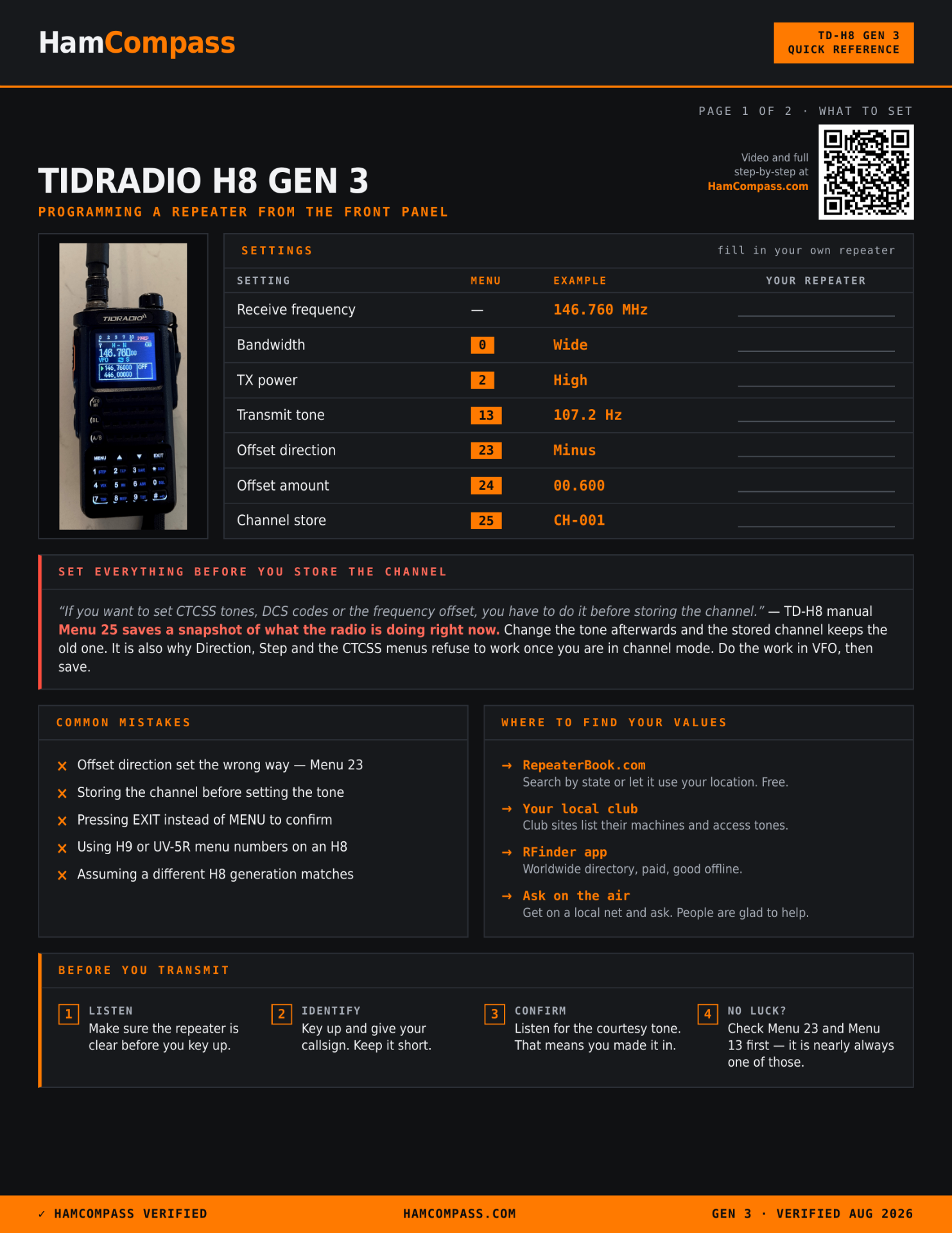
Page 1 — what to set, with the menu number beside each value.
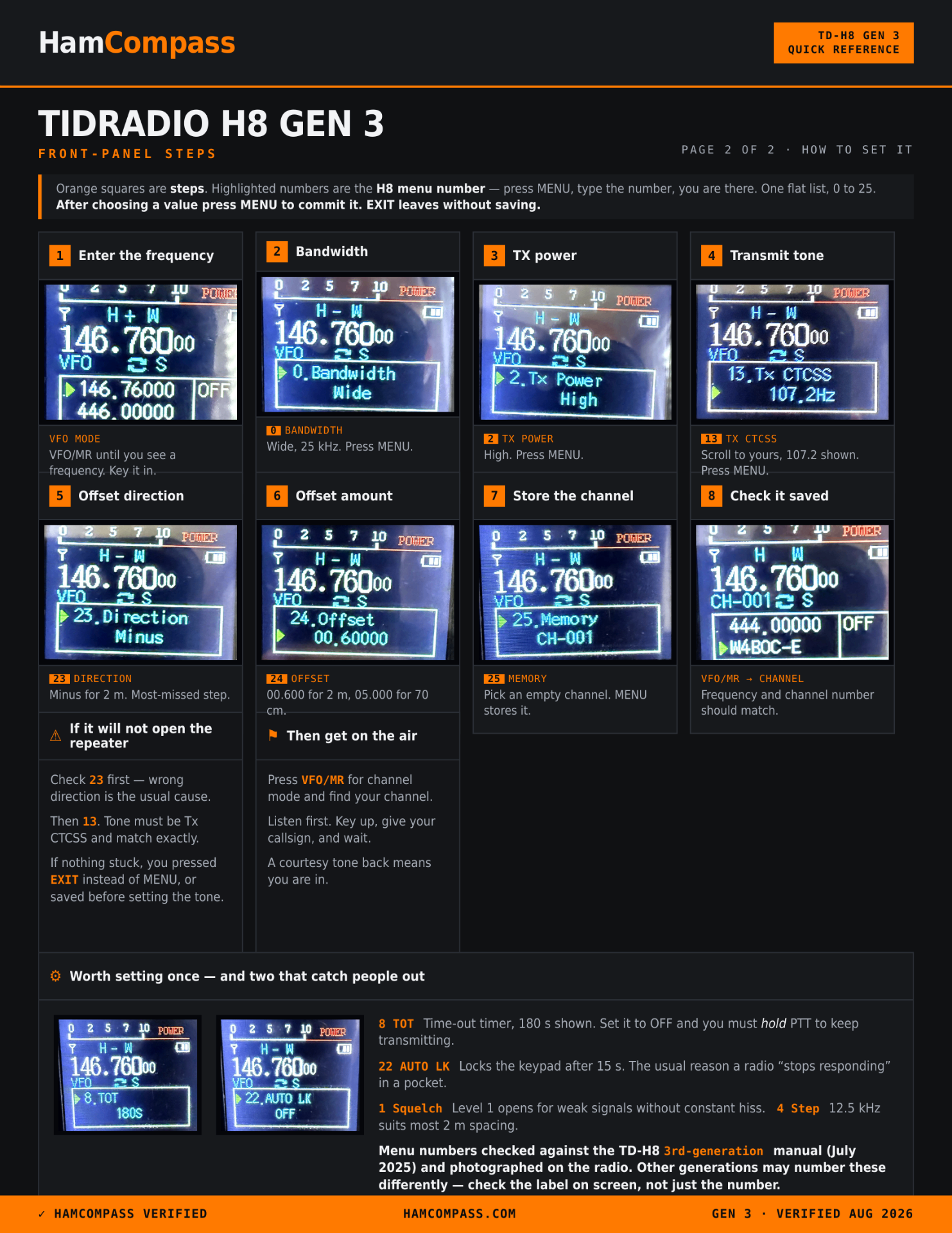
Page 2 — every step, with the actual screen you should be looking at.
Where the numbers come from
Every menu number on this page was checked twice: against the TIDRADIO TD-H8 Ham user manual, 3rd edition dated July 2025, and against photographs of the radio with each menu open. That matters because menu numbers move between models and firmware revisions. A number that is right for a UV-5R or an H9 will send you to the wrong setting on an H8. If a step here does not match what you see, check the label name on screen — Bandwidth, Tx CTCSS, Direction, Offset, Memory — rather than trusting the number alone.
TIDRADIO manual downloads (official)
Choose the TD-H8 ham version. TIDRADIO emails the file to you. It covers the menus this page skips, plus the full CTCSS and DCS tables.
Open link ↗Programming more than one repeater?
Front-panel programming is fine for one. For twenty, build your list in Radio Memory Manager and load it with CHIRP or ODmaster in a single pass. Free with a HamCompass account, and your list stays saved.
Open Radio Memory Manager ↗Video, procedure and photographs by N4CRP (Waves & Wings). Menu numbers verified against the TIDRADIO TD-H8 Ham user manual, 3rd edition (July 2025). Worked example uses the Stone Mountain Amateur Radio Club repeater, W4BOC. Repeater details change — confirm current frequency, offset and tone on RepeaterBook or with the sponsoring club.
HamCompass Verified · checked August 2026 — links and steps reference third-party sites that may change; verify against the official source linked above.